The sun and moon data is based on the SunCalc.net project and library.
Full credit goes to:
- Vladimir Agafonkin (@ mourner )
- Richard Körber
- James Yox for the Kastro library
for developing the SunCalc libraries.
The Map
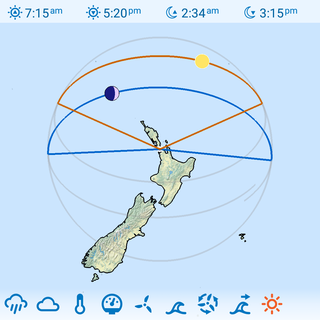
Horizon Line: the shaded circular outline represents the horizon.
Sun and Moon Paths: the paths within the horizon outline represent the path the sun (orange) and moon (dark blue) will follow. The distance the sun or moon is in from the horizon to the center is the elevation or altitude of the sun or moon. If the sun or moon is touching the horizon line, the celestial body will be on the horizon, and if it's at the center of the circle, then the body is directly above you.
The coloured segment of the path is when the sun or moon is above the horizon, and the shaded segment is when they are below the horizon.
You will also notice the celestial bodies change from coloured to/from shaded when they are above or below the horizon.
Rising and Setting Lines: are the lines that project from the center to the horizon outline. When shown these represent the time and azimuth (angle) at which the sun or moon will rise or set. For example, if you align your phone with the north direction and sunset line will point in the direction the sun is setting.
Moon Phase and Angle: the rendered moon also shows the phase and angle of the moon which you'll notice will change as you swipe.
Number Display: the numbers displayed above the map show the sunrise, sunset, moonrise and moonset in that order. This may change in the future when more sun/moon metrics are added.
Sun and Moon Elevation
Elevation is how high the sun or moon is above the horizon, in degrees. It is 90° when the body is directly above you, 0° on the horizon, and below zero when it has set.
 Sun Elevation
How high the sun is above the horizon. Below zero at night.
 Moon Elevation
How high the moon is above the horizon. Below zero when the moon is down.
Both can be used as gauges and on graphs:
- Gauges: long-press a gauge, tap Add, and pick from the Sun and Moon section.
- Graphs: add them in the Graph Editor as a Line or a Fill. The default range is 0 to 90°, so the graph only shows the sun or moon while it is up.
Tip: shade the nights on a graph
You can shade the night hours on any graph (Pro):
- Long-press the graph and tap Edit Graph.
- Add Sun Elevation as a Fill. Pick a grey, see-through colour. Move it to the bottom of the list so it sits behind the other plots.
- Long-press the graph, tap Edit Range, tick Elevation and set it from 0 to -1.
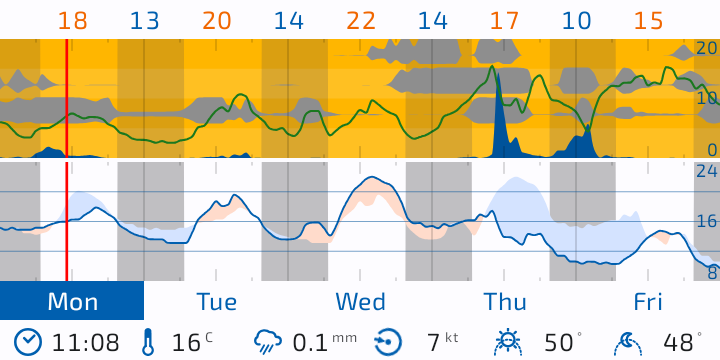
The graph is now shaded from sunset to sunrise. The range is saved for each place, so repeat step 3 for each place. Sun and moon elevation share the one Elevation range, so a moon elevation plot on the same place will use 0 to -1 too.
Future:
- nautical and astronomical times.
- day/night shading on the map. Help: if you know how to calculate this, please contact me.
If you'd like to add any suggestions, please post them on the Flowx Forum so we can keep track of them.